Run it so the result repeats
Test in an incognito window with extensions disabled, in mobile mode, on the exact URL a customer would land on. Run it three times and take the middle result. An ad blocker, a browser extension or a busy machine each move the numbers more than most app installs do.
Test a product page rather than the home page. Home page scores are the ones people quote and the ones that matter least, because most paid and email traffic arrives directly on a product.
The four numbers that mean something
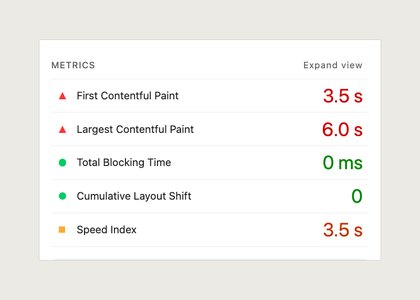
Largest Contentful Paint is the time until the biggest thing above the fold has drawn, usually your product image. Under 2.5 seconds is the target. If installing something moved LCP, that something is loading in front of your image.
Total Blocking Time is how long the main thread was too busy to respond to a tap. It explains the page that looks finished but ignores you for a moment. Scripts cause it, images do not.
Cumulative Layout Shift is how much the page moved while it loaded. A block that renders without reserving height is the usual cause, and it is the failure customers actually complain about, because it makes them tap the wrong thing.
Transferred bytes is not a score. It sits further down the report under network payloads, and it is the number worth quoting back to any app that describes itself as lightweight.
The two worth mostly ignoring
The performance score out of 100 is a weighted blend of the metrics above. It moves several points between runs on an identical page, so treating it as a target produces arguments rather than faster pages. Use it to spot a large regression, never to judge a small one.
Speed Index rarely tells a merchant anything Largest Contentful Paint has not already said, and it is the metric most sensitive to test conditions. Read it, do not act on it alone.
Turn the report into two decisions
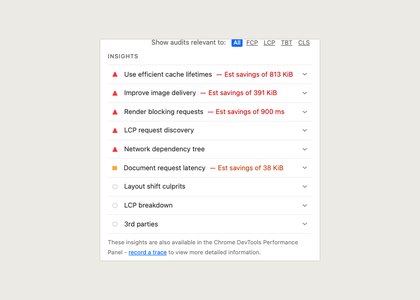
Everything in the opportunities section is a suggestion, and some of it cannot be acted on inside a hosted Shopify theme at all. Read it looking for two things only: a request you did not know your store made, and a resource loading earlier than it needs to.
Then decide whether the thing costing you time earns anything. A rating summary above the fold costs a little and helps someone buy. A chat widget loading at first paint costs a lot and could load on scroll instead. That judgement is yours and the report cannot make it.
Keep the evidence. Export the JSON, save it next to the date you ran it, and next year the question of whether the store got slower is answered by a file rather than by an impression.
What to do when the number will not move
Sometimes you fix everything within your control and Largest Contentful Paint sits exactly where it was. Two causes account for most of those cases. Your hero image is much larger than the space it renders into, so the browser downloads far more than it draws. Or the image is not the element being measured at all, and LCP is being set by a heading in a web font that arrives late.
Lighthouse tells you which element it timed, in the LCP detail of the report. Read that before changing anything. Optimising the wrong element is the most common way a merchant spends a week on performance and ends up with the same number and less patience.
Something on this page no longer true, or a measurement that disagrees with it? Tell us and we will correct it.