Resources

Running a fast storefront that has apps on it.

What app blocks cost, how to measure it on your own theme, how to upgrade without breaking installs, and how to audit the apps already sitting in your store.

Guides, in the order a merchant usually needs them.

Each one is written to be finished in a sitting and repeated on your own store. Where a guide names a tool, it names the theme and the Shopify plan it was checked against.

Nothing here is gated. No form, no download, no sequence of emails afterwards.

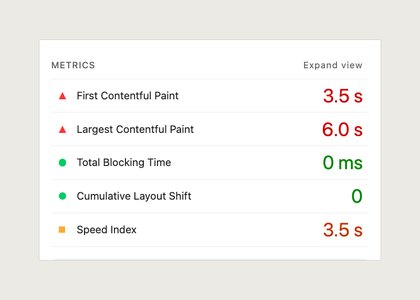
  • The metrics panel of a Lighthouse mobile report: First Contentful Paint 3.5 s, Largest Contentful Paint 6.0 s, Total Blocking Time 0 ms, Cumulative Layout Shift 0, Speed Index 3.5 s

    Performance

    What an app block actually costs your Largest Contentful Paint

    Anything rendering above the fold competes with your hero image. How to find which block is holding the number back, using the tools already in your browser.

    Guide, about 9 minutes. Checked on Dawn 15.

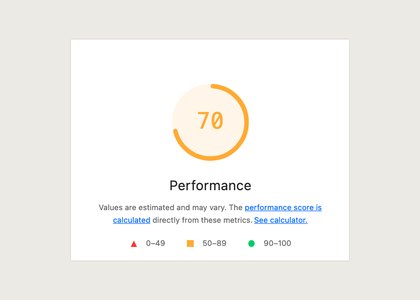
  • The Performance score of a Lighthouse mobile report, 70, with the score ranges below it

    Measurement

    Reading a Lighthouse report without a developer

    Which four numbers matter to a merchant, which ones are noise, and how to run the test twice so the second result means something.

    Guide, about 7 minutes. Includes a repeatable test method.

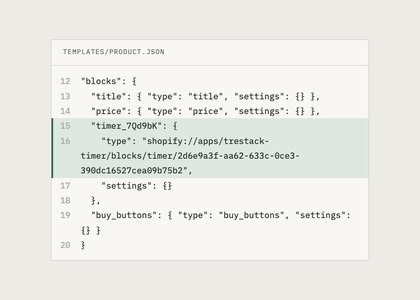
  • An excerpt of templates/product.json in which an app block is stored as a block entry with a shopify://apps type

    Theme upgrades

    Upgrading a theme without breaking what is installed

    App blocks survive a theme update, hard coded snippets do not. A pre flight checklist for the day you move to a new theme version, and what to check on the other side.

    Checklist, about 12 minutes. Print or work through it in the editor.

  • App audit

    Auditing the apps already installed on your store

    Open the app list, sort by what still earns its place, and find the ones left behind by a trial you forgot. Includes how to spot a leftover script tag from an app you removed months ago.

    Worksheet, about 20 minutes for a store with ten apps.

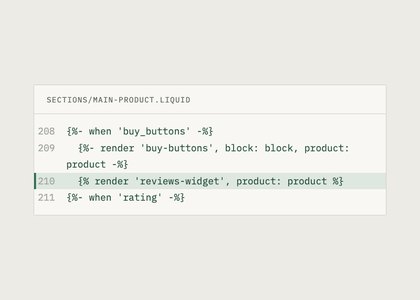
  • An excerpt of sections/main-product.liquid with a hard coded render tag for a reviews widget under the buy buttons

    Theme work

    App block or hard coded snippet, and how to tell what you have

    Two ways an app can end up on your storefront, with very different consequences at upgrade time. How to look at your theme files and see which one you are living with.

    Guide, about 8 minutes. No code editing required to follow it.

  • App hygiene

    Uninstalling an app cleanly, and what usually gets left behind

    Removing an app from the admin is not always the end of it. Where residue hides, what is safe to delete yourself, and when to ask the vendor rather than edit Liquid.

    Guide, about 10 minutes. Back up your theme first.

  • Billing

    Reading your Shopify app bill line by line

    Trials that converted, usage charges that scaled with orders, and apps billed annually that you will not see again for months. A once a quarter habit worth keeping.

    Guide, about 6 minutes. Pairs with the app audit worksheet.

Topics the hub covers.

Four groups, all of them about the seam between a theme and the apps installed on it. If a topic you need is missing, ask for it and we will either write it or say we cannot.

Ask for a guide
Measurement
LighthouseCore Web VitalsLargest Contentful PaintCumulative Layout ShiftScript sizeRepeatable testing
Theme work
Theme app extensionsApp blocksOnline Store 2.0Theme upgradesLiquid snippetsPage builders
App hygiene
App auditsClean uninstallLeftover script tagsOverlapping appsPermissions review
Billing and admin
TrialsUsage chargesAnnual plansDevelopment storesShopify billing

We make a countdown timer, so we do not rank countdown timers.

TreStack makes one app, TreStack Timer. Any list of countdown or urgency apps we published would have our own product on it, and you would be right not to trust it. So the hub does not publish one. We write about the theme side, what a block costs and how to test it, and we leave the ranking to people who are not selling against it.

Review, bundle, and checkout apps are planned after Timer, so the hub will not rank those categories either.

  1. No rankings where we compete

    No countdown timer shortlist and no urgency app comparison. Not now and not with a disclaimer at the top.

  2. No paid links

    Nothing on the hub earns TreStack a commission. A tool is named because it is the usual answer to the question, not because naming it pays.

  3. Order is editorial, never commercial

    Nothing moves up a list because it pays more, and no tool buys a mention. A vendor cannot pay to be added or pay to be removed.

  4. Our own app is labelled as ours

    When a guide uses TreStack Timer as the worked example, it says so in the paragraph that introduces it.

Where to go from here

The hub gathers the guides. Two other places carry the rest of the writing.

Blog

Longer pieces and release notes

The posts that do not fit a checklist. Why a block loads the way it does, what we found while testing against a new theme version, and the reasoning behind a change before it turns into documentation.

  • Written by the people building the code
  • Every performance claim states how it was measured
  • No posts ranking countdown timer apps

Docs

Setup, settings, and the numbers

The reference side for TreStack Timer. How to install it and turn on the app embed, what each timer setting does, the permissions it asks for, and what uninstalling removes.

  • Install and app embed steps
  • Timer settings, one by one
  • Permissions, and a clean uninstall