Blocks, upsells, and rules for the pages where buyers pay.
Add blocks to Shopify's checkout, thank you, and order status pages in Shopify's own checkout editor. Hide, rename, or reorder payment and shipping methods, and stop orders that break your rules, with Shopify Functions. Nothing is added to your theme. TreStack Checkout is coming to the Shopify App Store and cannot be installed yet.
Running since 17 October 2026, not listed yet. Plans start at $14 a month with a 14 day free trial, billed by Shopify. Free on development stores.
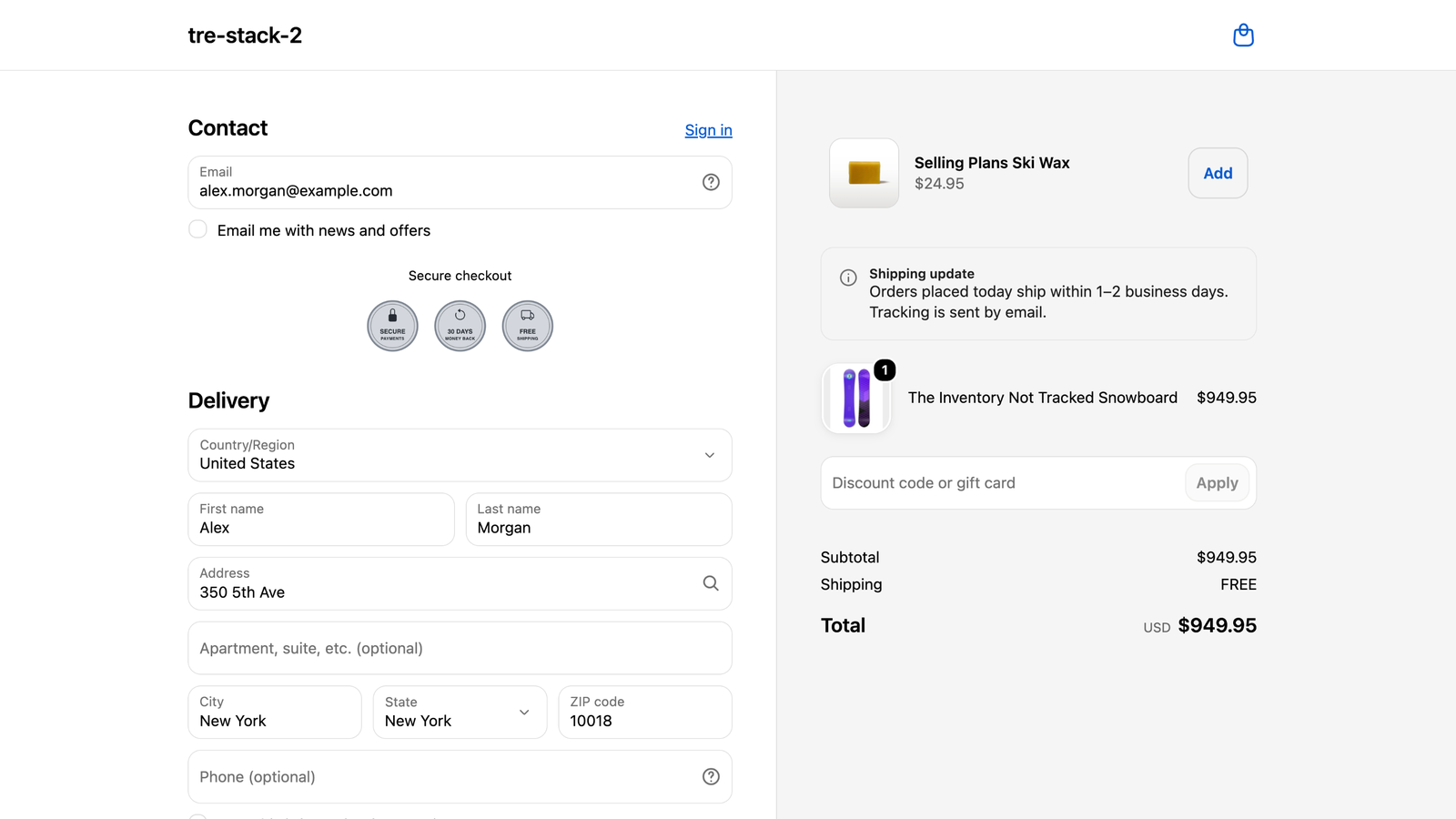
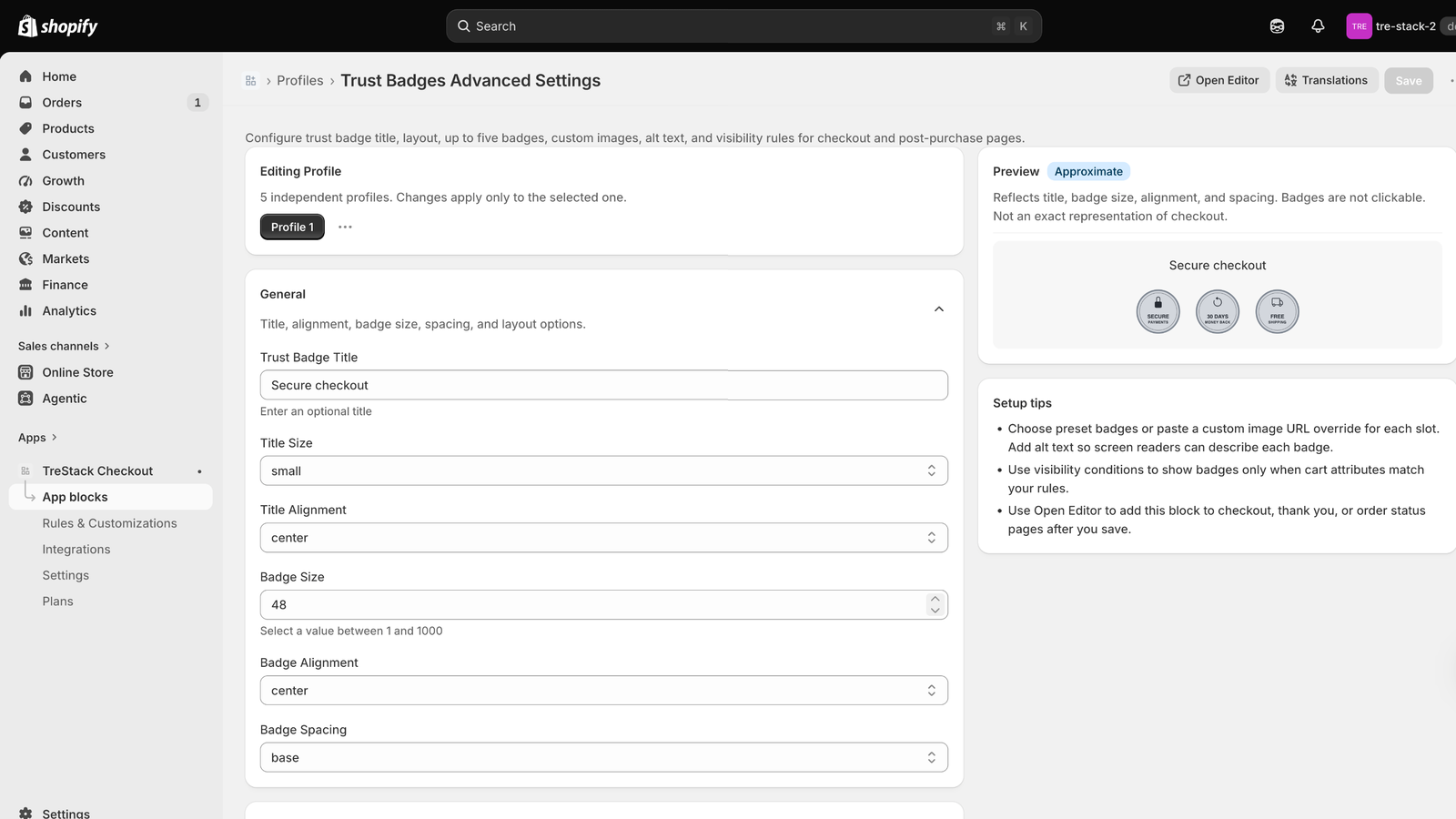
On a development store: trust badges, an upsell, and a banner, each a block placed in Shopify's checkout editor.
Every page from cart to order status.
Blocks for three pages, an offer after payment, and rules that change how checkout behaves. Each part names the plan it needs.
Thank you and order status blocks
Banners, trust badges, contact info, social links, a call to action, and more on the pages after the order. Each block has five or ten profiles, so the same block can show different content in different places, and display conditions such as the products in the cart, the shipping country, or whether the buyer is signed in.
Every plan
Checkout blocks
The same blocks on the checkout page itself, plus fields only checkout has: custom checkboxes and inputs, payment icons, and delivery instructions. An input can save the buyer's answer on the order, and can stop checkout until it is filled in correctly.
Growth or Pro, on Shopify Plus
Payment and shipping rules
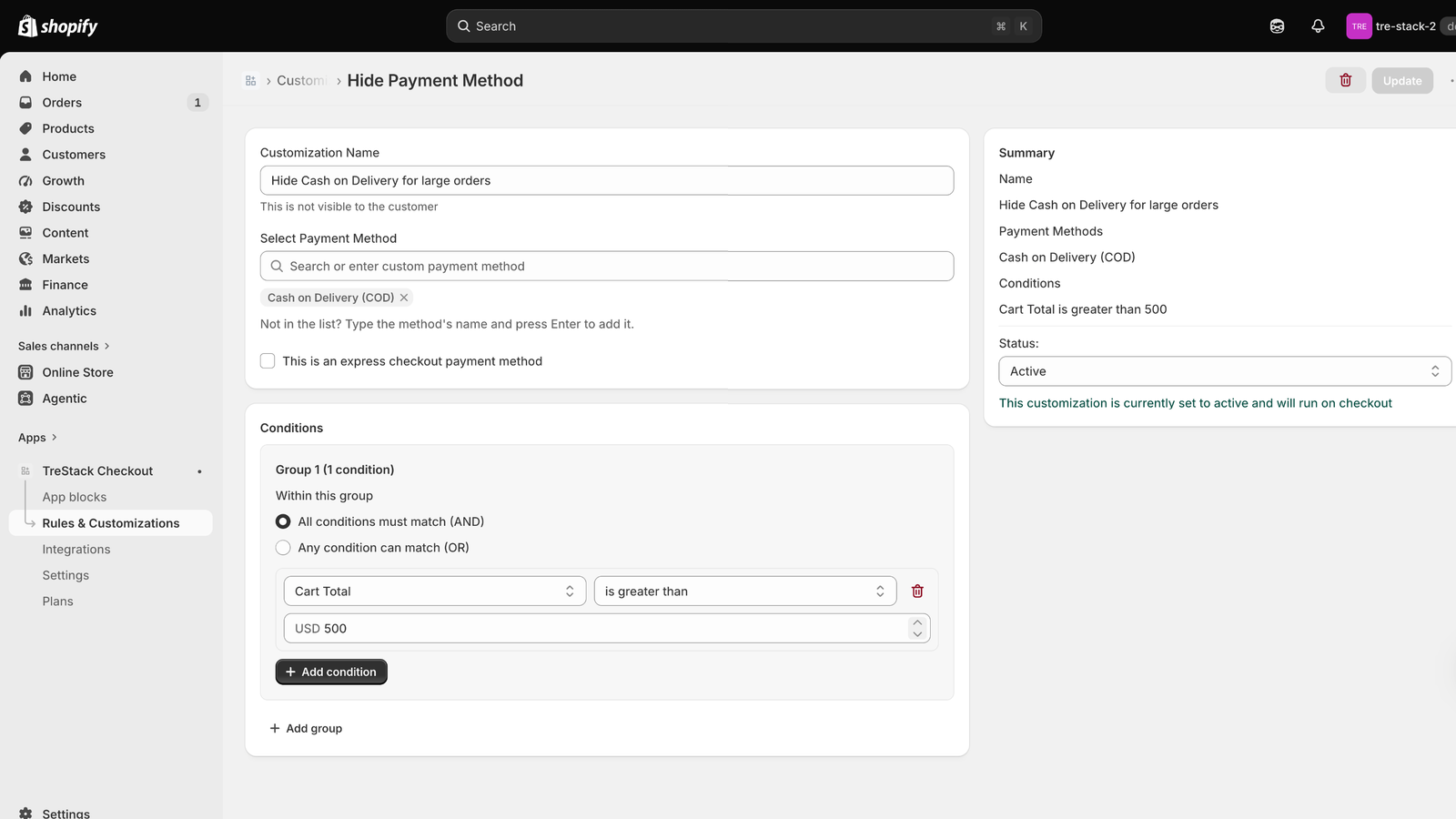
Hide, rename, or reorder payment methods and shipping options when your conditions match, for example cash on delivery hidden on large orders. Order validation stops checkout with your own message. Cart links fill a cart and send the buyer to checkout.
Every plan
Post-purchase page
One offer per order between payment and the thank you page: a product added to the order already placed, a call to action, or a survey. A countdown and a quantity picker are optional.
Every plan
Upsells and gifts
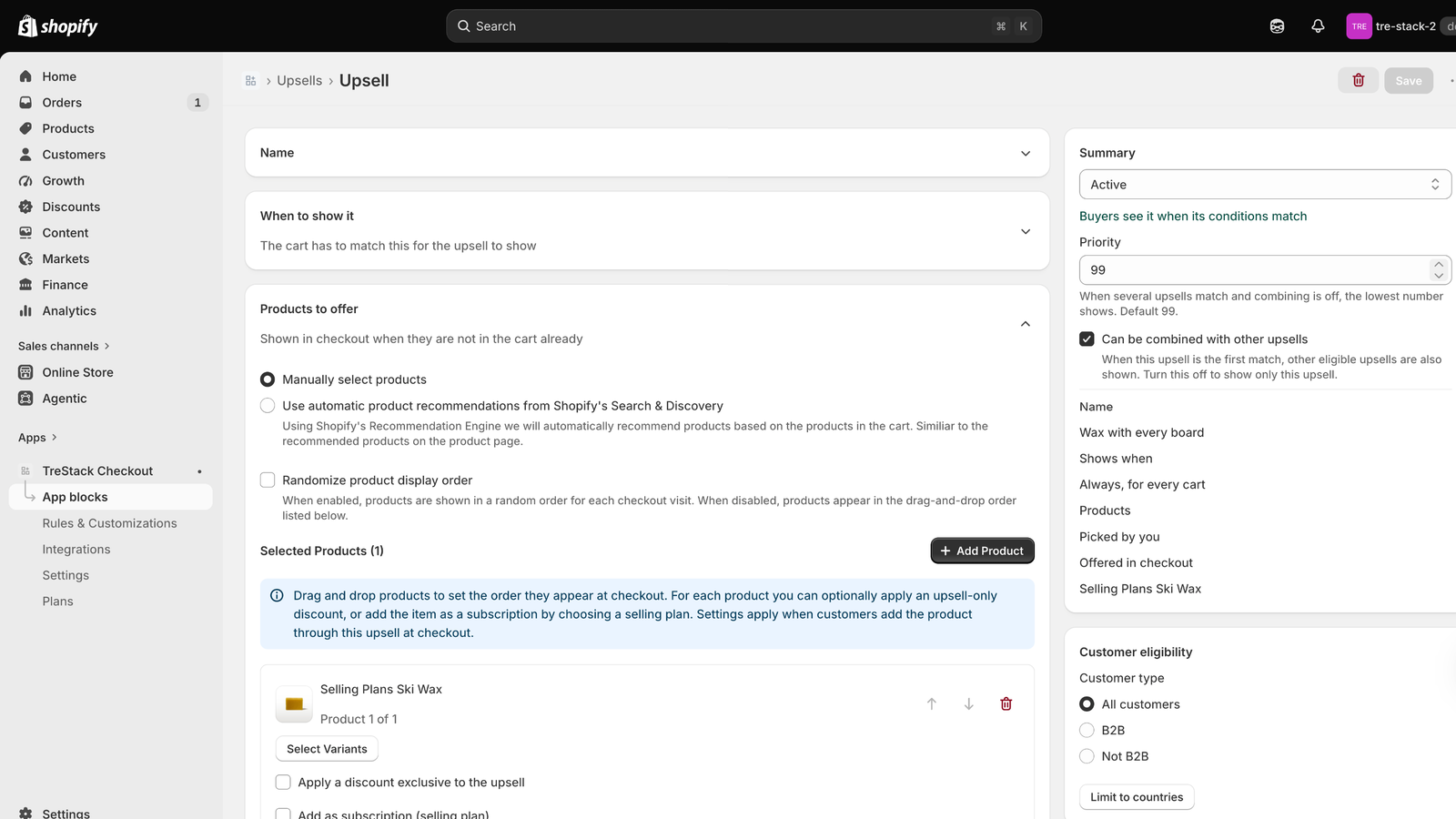
Offer products in checkout, chosen by hand or from Shopify Search & Discovery recommendations, with an optional discount only for the upsell. Gifts add free products to the cart while a condition is met and take them out when it is not. On a store not on Shopify Plus, every plan includes upsells on the thank you and order status pages.
Pro, on Shopify Plus
Surveys and forms
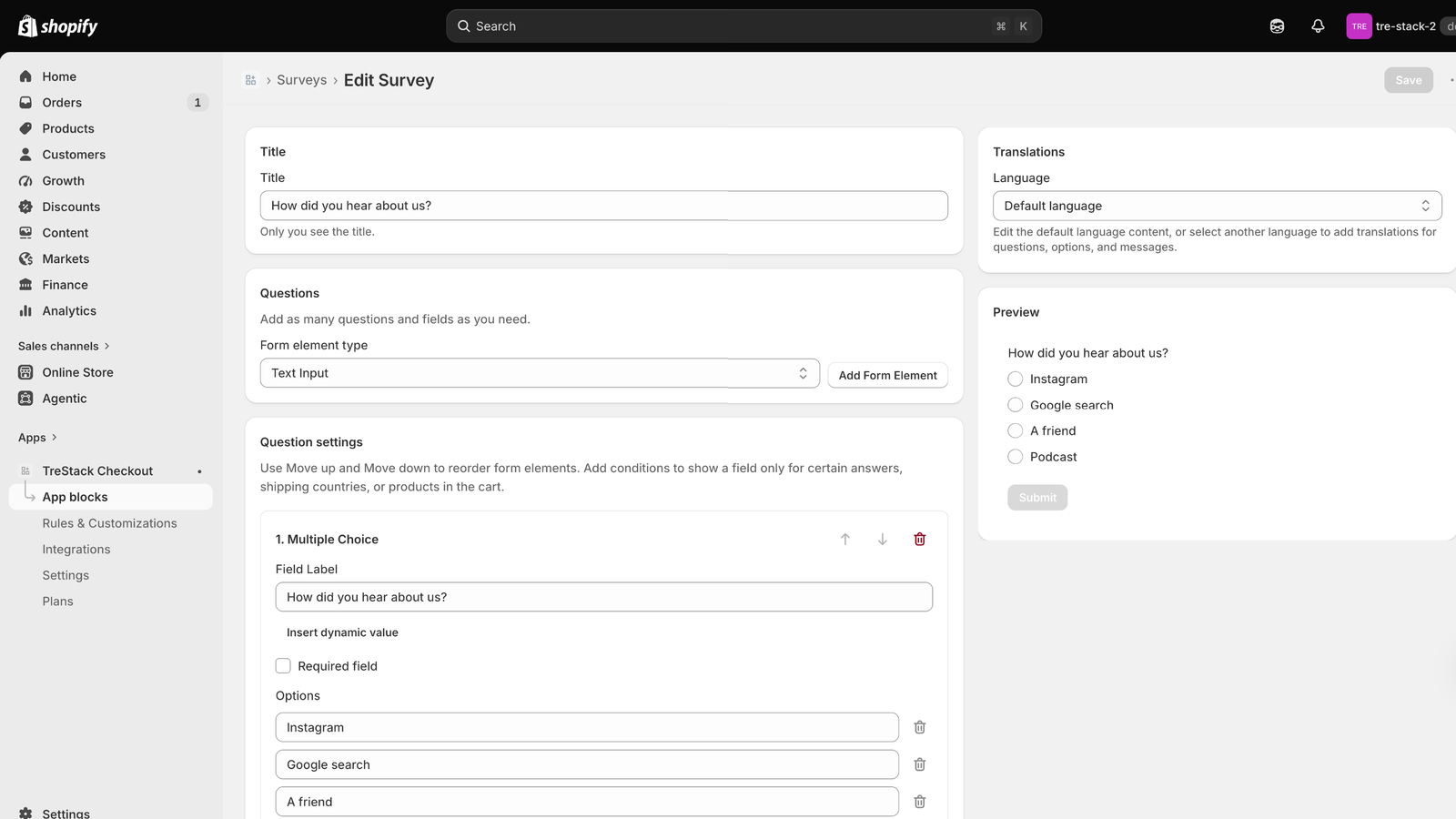
Questions in checkout, on the thank you and order status pages, or on the post-purchase page. Answers are kept with the order, saved on the order in Shopify, and exported as CSV. On a store not on Shopify Plus, every plan includes surveys on the thank you, order status, and post-purchase pages.
Pro, on Shopify Plus
Checkout branding
Colours, fonts, corner radius, and the style of each section of your checkout, saved through Shopify's own checkout branding settings, with a preview before you save.
Pro, on Shopify Plus
A block's settings live in profiles, with a preview beside the form. Saved changes reach checkout without opening the checkout editor again.
Set up in the app, run by Shopify.
Rules
Payment and shipping methods that follow your conditions
A rule has a name only you see, a status of Active or Draft, and groups of conditions such as the cart total, a product, a collection, the shipping country, or a customer tag. Without conditions it always applies.
Rules run as Shopify Functions inside checkout. If Shopify refuses one, Home says so and the rule can be saved again.
Upsells
Offers in checkout, counted in the analytics
Choose when an upsell shows, which products it offers, and who sees it. Products already in the cart are never offered. Upsell analytics shows what was added to cart, sold, and earned, by page, by upsell, and by product.
Checkout numbers come from the app's web pixel, only for buyers who allow analytics in your cookie banner. Review stars from Judge.me or Okendo can show on each offered product.
Surveys
Ask buyers a question, and keep the answer with the order
Text, choice, checkbox, dropdown, and date questions, each one required or not, and shown only for certain answers, countries, or products. Survey results shows the answers by day, by choice, by question, and by order.
Buyers' email addresses are not kept with their answers unless you turn that on in Settings.
Placed in Shopify's checkout editor, not in your theme.
Blocks are Shopify checkout extensions and rules run as Shopify Functions, so nothing is added to your theme. Uninstall the app and its blocks, rules, and offers stop at once. Rules need no checkout editor step at all.
Step one
Pick a plan
Every plan starts with a 14 day free trial, approved in Shopify. Development stores skip this step.
Step two
Set up a block
Under App blocks, pick a page and a block, add a profile from a template, and save.
Step three
Place it in checkout
Open the checkout editor from the app and add the block where Shopify allows it.
Step four
Pick its profile
Choose the profile in the block's settings and save the editor.
What needs Shopify Plus, and what does not.
Thank you, order status
Any Shopify plan
Blocks on the pages after the order, from Starter.
Rules and cart links
Any Shopify plan
Payment, shipping, and validation rules, from Starter.
Checkout page blocks
Shopify Plus
With the Growth or Pro plan.
Without Plus
Upsells and surveys
Starter includes them on the thank you and order status pages.
Shopify allows app blocks on the information, shipping, and payment steps of checkout only on Shopify Plus. Thank you and order status blocks, payment and shipping rules, and order validation run on every Shopify plan, which is what Starter covers.
Pricing
Each plan adds to the one before it. Growth and Pro need a store on Shopify Plus, because Shopify allows app blocks on the checkout page itself only on Plus.
TreStack Checkout prices in USD. 14 day free trial on every plan, 25 percent off when billed yearly. Billed through Shopify, on the invoice you already get. Free on development stores, with every feature.
Plan
Monthly
Yearly, per month
Billed yearly
Shopify Plus
What this plan adds
Starter
$14
$10.50
$126
Not needed
Thank you and order status page blocks, the post-purchase page, payment and shipping rules, order validation, and cart links.
Growth
$37
$27.75
$333
Needed
Everything in Starter, plus blocks on the checkout page itself.
Pro
$74
$55.50
$666
Needed
Everything in Growth, plus upsells, gifts with purchase, surveys and forms, checkout branding, review ratings, advanced analytics, and priority support.