Measure the page before you touch anything
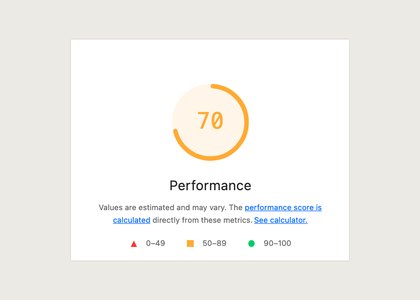
Open the product page you care about in an incognito window with extensions disabled, run Lighthouse in mobile mode, and note the Largest Contentful Paint value and the total transferred bytes. Run it three times and keep the middle result. A single run on a busy laptop varies by half a second, which is wide enough to hide the thing you are looking for.
Write the numbers down somewhere outside the browser. You are about to compare four or five variations of the same page, and the tab you measured in will not remember which was which.
Turn blocks off one at a time in the theme editor
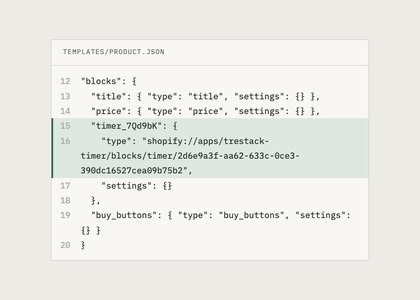
Online Store 2.0 themes let you hide any app block from the theme editor without uninstalling the app. Select the block, hide it, save to an unpublished duplicate of your live theme, and measure again. Hiding is reversible in one click and it does not touch your product data or the app configuration.
Work in one direction only. Hide block A, measure, restore it, then hide block B. If you hide three at once you learn that three blocks cost you 900 milliseconds and nothing at all about which one is responsible.
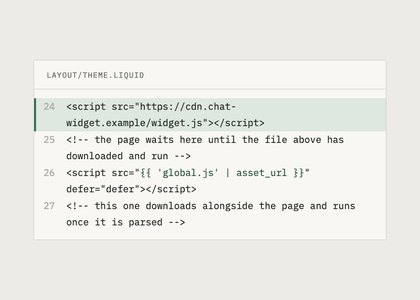
Apps that still install by writing a script tag into your layout will not appear in the theme editor. Those are worth checking first, because they load on every template whether the page uses them or not.
Read the waterfall rather than the score
In the browser network panel, filter to scripts and sort by time. You are looking for three things: a request that begins before your hero image finishes, a third party domain you do not recognise, and anything larger than about 50 KB compressed. A block that fetches its own web font or its own copy of a charting library shows up immediately.
The single Lighthouse performance score is a weighted blend and moves for reasons that have nothing to do with apps. Track the metrics separately instead. Largest Contentful Paint tells you whether something is loading in front of your main image, Total Blocking Time whether a script is holding the main thread, Cumulative Layout Shift whether a block is being inserted after layout and pushing content down.
What an honest block looks like
A theme app extension block should request one script from the Shopify CDN, load it deferred, reserve its own height so nothing jumps when it fills in, and render nothing above the fold unless you placed it there. It should not load a font of its own unless you chose one, and then only the characters its own text uses.
When you find the block that costs the most, ask whether it needs to be where it is. A rating summary near the buy button earns what it costs. A full review list rendering forty entries near the top of the template is a layout choice rather than a performance problem, and moving it below the description usually recovers the whole cost.
Then send the pair of Lighthouse runs to whoever makes the app. If it is TreStack Timer, that is a bug report and we treat it as one.
When the block is not the problem
Two things get blamed on apps more often than they deserve. The first is images. A hero uploaded at 4000 pixels wide and scaled down by the theme costs more than every app block on the page put together, and it appears in the report as bytes rather than as script time. The second is a theme section rendering a large collection above the fold, which is slow whether or not anything is installed.
Check both before you start hiding blocks. If the transferred bytes number is dominated by one image, fix that first and measure again. You will often find the remaining app cost is small enough that the placement question answers itself, and you have avoided a week of arguing with a developer about 40 KB.
Something on this page no longer true, or a measurement that disagrees with it? Tell us and we will correct it.