Why the duplicate stops being useful
Duplicating your live theme copies the code and the template JSON, which is most of what you need. What it does not copy is anything living outside the theme: app configuration, metafield values, published state, or the settings somebody edits in the live theme editor next Tuesday.
Within a week the copy differs from production in ways nobody wrote down, and a test that passes on it proves very little. The fix is not a better duplicate. It is a shorter life.
Duplicate late, throw away early
Treat a staging theme as disposable. Duplicate it the day you need it, do the work, publish or discard, then delete it. A theme that exists for two days cannot drift far enough to lie to you.
Name it with a date and a purpose rather than a version number. Something like 2026 07 timer bar reads clearly in a theme list six weeks later. Shopify allows a limited number of unpublished themes, and a library full of copies called theme copy 4 is how merchants end up publishing the wrong one.
What still differs, and what to do about it
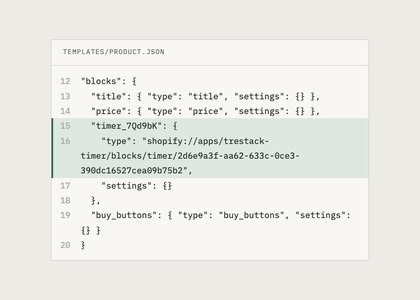
App block placements copy across, because they are stored in the template JSON, and the settings inside each block copy with them. What does not copy is anything held in the app itself: schedules, targeting rules, end dates, discount tiers. Expect to set those again, or accept that you are testing against last month rules.
Inventory and orders are shared with production, which cuts both ways. Your test data is real, which is useful, and a test order is a real order, which is not. Use a draft order, or a development store with a bogus gateway, when you need to complete a checkout.
Some behaviour cannot be tested on a preview link at all, because it depends on being published. Anything a search engine, a payment provider, or an external pixel sees falls into that group. Plan a short window after publishing to check those live.
Use the preview link as the review step
The preview link for an unpublished theme is shareable and does not require admin access, so it is the right thing to send to whoever signs off a page. Ask them to look on a phone, at the four pages you already hold a baseline for.
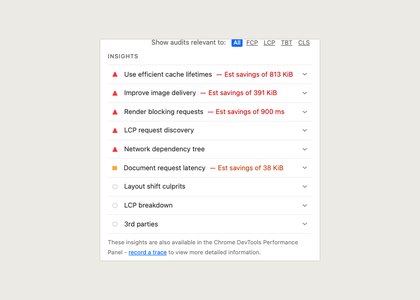
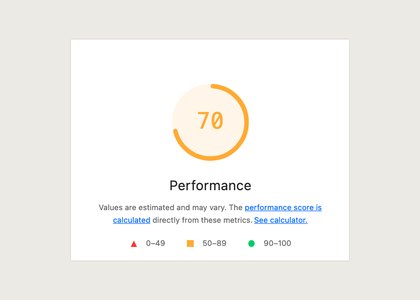
Run your Lighthouse comparison knowing the preview carries a small overhead of its own. Compare preview against preview, or publish and compare live against live, but never compare a preview number to a live one and call the difference an app.
Then publish, keep the previous theme in the library for a fortnight, and delete the staging copy the same day. Rolling back stays one click, and nothing stale is left waiting to confuse you next quarter.
A short checklist for the day itself
Before you publish: the four baseline pages captured on the current theme, every app block placement matched against the old theme, the app side rules checked rather than assumed, and the preview link signed off by whoever owns the page. Four items, and none of them takes longer than the rollback would.
After you publish: the same four pages measured again, the cart and one discount or bundle path walked through as a customer would walk it, and the previous theme left in the library. Then delete the staging copy while you still remember why it existed. That last step is the one everybody skips, and it is why the next upgrade begins with a theme list nobody trusts.
Something on this page no longer true, or a measurement that disagrees with it? Tell us and we will correct it.